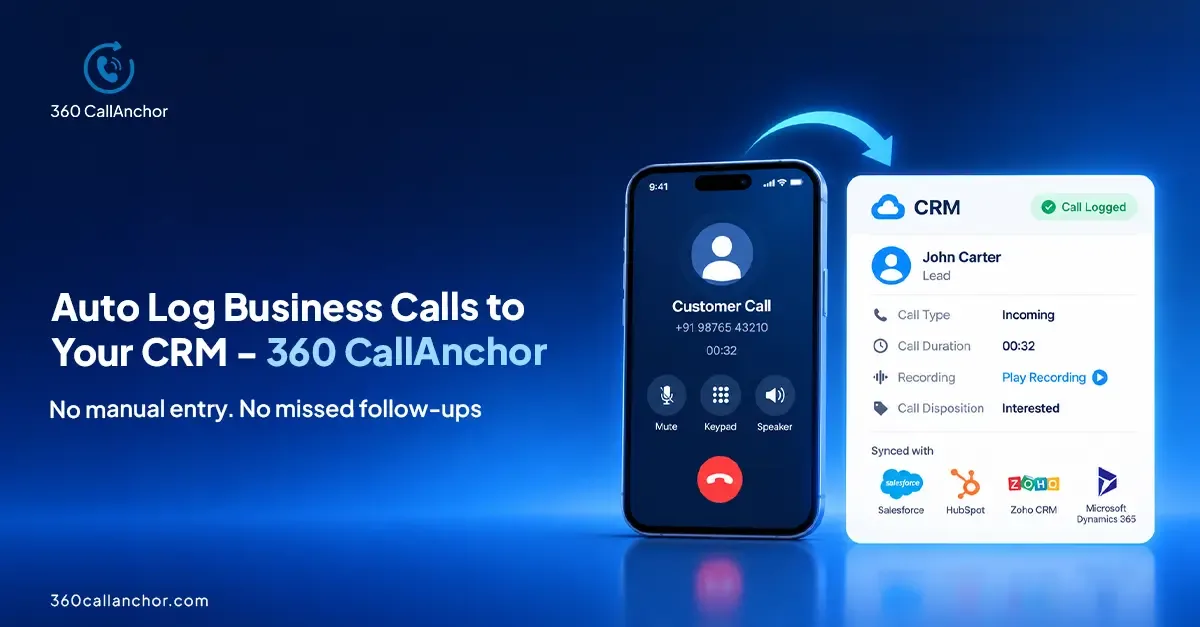
Mobile call logging software automatically records the details of business calls made and received on employees' mobile phones, then saves them to your CRM. Instead of reps typing notes after every conversation, the software captures who was called, when, for how long and with what outcome. Sales and service leaders get a complete call history without asking anyone to change how they phone customers.
For teams that sell on the road, work from home or use their own handsets, this closes a big gap. Desk phones and contact-centre tools log calls well. Mobile calls, by contrast, often vanish from the record, even though they are where many deals actually move forward.
How mobile call logging software works
Most products follow the same basic flow. A small app runs on each rep's phone with permission to read call events. When a call ends, the app collects the call details and sends them to a sync service. That service finds the matching contact, lead or account in the CRM and attaches the call as an activity.
- Capture: the app notices an incoming, outgoing or missed call on the business number.
- Enrich: it adds the call direction, start time, duration and the user who handled it.
- Match: the phone number is looked up against existing CRM records.
- Sync: a call activity is written to the matching record, ready for reporting.
- Follow up: the rep adds an outcome or next step, so the history stays useful.
This is how it looks in practice with 360 CallAnchor: incoming, outgoing and missed business calls are captured automatically, including timestamp, duration, direction and user attribution. Every business call is pushed into the right CRM record, and when an incoming number doesn't match an existing record, a new lead record is created automatically. You can see the full flow on the SIM-based call logging page.
What data does it capture?
The value of a call log depends on how complete it is. A good tool records enough context for a manager to coach and for the next rep to pick up the conversation. The table below shows the data points buyers usually look for and why each one matters.
| Data point | Why it matters |
|---|---|
| Call direction | Separates prospecting effort from customers calling in. |
| Timestamp | Shows when contact happened and how fast leads were followed up. |
| Duration | Distinguishes real conversations from quick hang-ups. |
| User | Attributes every call to the right rep for coaching and reporting. |
| Missed calls | Highlights callbacks that are still owed to customers. |
| Outcome or disposition | Records what happened and what should happen next. |
| Recording | Supports quality checks and dispute resolution, where consent allows. |
On this point, 360 CallAnchor captures six data points on every call automatically. Call duration, timestamp, direction and the recording are captured as soon as the call ends, so nothing depends on a rep remembering to log it later.
Why sales teams use mobile call logging
The main reason is simple: manual logging rarely happens consistently. Reps are busy, calls run back to back, and typing notes into a CRM on a phone is slow. The result is a CRM that shows emails and meetings but almost none of the phone work behind them.
- Better CRM data quality: every call appears on the record without extra effort, so pipeline reviews reflect reality.
- Visibility for managers: leaders can see activity by rep, by day and by outcome instead of relying on self-reported numbers.
- Faster handovers: when an account changes owner, the new rep can read the full call history.
- Field and remote teams: people who rarely sit at a desk still produce a complete activity record.
- Coaching: talk time and call patterns show where a rep needs support.
For reporting, 360 CallAnchor tracks total calls, total talk time, average talk time, agent call duration, missed calls and disposition breakdown. Those measures are covered in more detail on the mobile call analytics page.
SIM-based call logging compared with VoIP apps
There are two broad ways to log mobile calls. The first works with the phone's own dialer and mobile network, often called SIM-based logging. The second routes calls through a separate VoIP app with its own virtual number. Both can feed a CRM, but they ask very different things of your team.
| Question | SIM-based logging | VoIP calling app |
|---|---|---|
| Which number do customers see? | The rep's existing mobile number. | Usually a new virtual number. |
| Do reps change how they call? | No, they keep using the normal dialer. | Yes, calls are made inside the app. |
| What does call quality depend on? | The mobile network. | The data connection. |
| How much training is needed? | Very little. | Some, because the workflow changes. |
360 CallAnchor takes the SIM-based route. It runs quietly alongside the calls your team already makes, without requiring a new SIM card, a new dialer or an app to learn. It's worth knowing the boundary too: it captures calls made through the device's native dialer over the mobile SIM network and does not currently support WhatsApp calls.
How it connects to your CRM
Integration depth matters more than the number of logos on a vendor's website. Check how each CRM is connected, what gets written, and how records are matched. Ask whether calls arrive as activities on the right contact, lead or account, and whether recordings and outcomes come along with them.
Here is how 360 CallAnchor approaches it. It supports direct integration with Salesforce, and the Salesforce connection is done via OAuth. All CRMs other than Salesforce connect via webhook or API; for example, the HubSpot integration connects via webhook. The full call record, audio included, goes into whichever CRM your team already uses. The CRM call sync page explains the setup.
Privacy, consent and data storage
Call data is personal data, so treat it with care. Before rolling out any tool, confirm where call data is stored, who can access recordings and how long they are kept. If you record calls, check the consent rules in every country where your team operates and tell callers when recording is on.
Storage design is one of the questions to ask every vendor. With 360 CallAnchor, call data passes through the service and customer data is not stored permanently on its servers; client data is stored directly in your CRM instead. In addition, call data that has already synced to the CRM stays there and is not deleted when a license is removed.
How to choose mobile call logging software
Use a short checklist when you compare products. It keeps the evaluation focused on how your team actually works, rather than on feature lists.
- CRM fit: does it support your CRM natively, and what exactly is written to each record?
- Matching rules: how are calls matched to contacts, and what happens with unknown numbers?
- Rep experience: can people keep their usual number and dialer, or must they change habits?
- Recording controls: can recording be configured to meet your consent obligations?
- Personal calls: how does the tool keep personal conversations out of the business record?
- Licensing: is pricing per user, per number or per device, and how does that match your team?
- Reporting: are the call metrics you need available without exporting data?
On licensing, for instance, each 360 CallAnchor license is tied to one mobile number. Whatever you choose, run a short pilot with a few reps and compare the CRM record before and after. That comparison usually makes the decision clear.
Frequently asked questions
Is mobile call logging the same as call recording?
No. Call logging captures the details of each call, such as direction, time, duration and outcome. Call recording stores the audio itself. Many tools offer both, and recording usually needs extra consent steps.
Do reps need a new number or dialer?
Not with SIM-based tools. 360 CallAnchor works alongside the calls a team already makes, without a new SIM card, a new dialer or an app to learn. VoIP-based tools, by contrast, usually move calling into their own app.
Which CRMs can mobile call logging software connect to?
It depends on the vendor, so check the integration method for your CRM. 360 CallAnchor supports direct integration with Salesforce, and all other CRMs connect via webhook or API.
Can mobile call logging capture WhatsApp calls?
Many tools only see calls placed through the phone's dialer. 360 CallAnchor captures calls made through the native dialer over the mobile SIM network and does not currently support WhatsApp calls.
What happens when a call comes from an unknown number?
Good tools handle this automatically rather than dropping the call. When an incoming number doesn't match an existing record, 360 CallAnchor creates a new lead and attaches the call data to it.
See 360 CallAnchor in action
Share a few details and our team will get back to you.
Book a free demo to get your questions answered, or compare plans on the pricing page.

Diksha Gathania
Assistant Manager - Content
Diksha is a content marketing professional skilled at simplifying technical topics and creating engaging content across Salesforce, marketing automation, and analytics.
Connect on LinkedIn