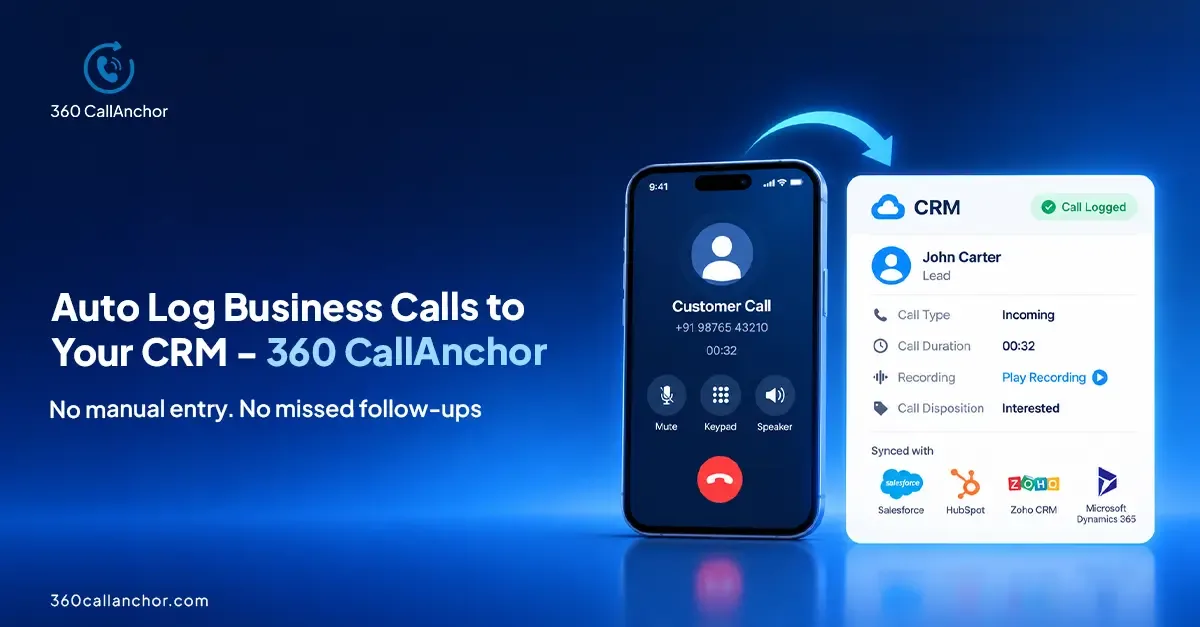
Mobile call logging software works by detecting each business call on a rep's phone, recording key details such as time, duration and direction, and then pushing that data into the CRM record that matches the caller's number. Good tools do this automatically when the call ends, so reps never type call notes by hand and managers see every conversation in one place.
What mobile call logging software actually does
Sales, recruiting and field teams spend much of the day on mobile phones. Those calls often happen away from the desk, outside the CRM, and on the device's own dialer. Without a logging tool, the call exists only in the phone's history. Nobody else can see it, report on it or follow up from it.
Mobile call logging software closes that gap. It sits between the phone and the CRM. It notices when a business call starts and ends, collects the call details, and writes a structured activity record into the system your team already uses. The goal is simple. Every customer conversation should leave a trace in the CRM without extra effort from the rep.
360 CallAnchor tracks inbound and outbound calls, measures talk time, monitors team activity, visualizes performance and syncs call data directly to a CRM. That combination is what turns a phone log into usable sales data.
How mobile call logging works, step by step
Most tools follow the same basic flow, even if the details differ. Understanding each stage helps you judge where a product is strong and where it may leave gaps.
Step one: capture the call on the device
The first job is detection. A lightweight app on the phone watches for calls placed or received on the business number. Some tools require reps to dial through a separate app or a virtual number. Others work with the phone's built-in dialer and SIM, so reps keep their normal habits.
360 CallAnchor captures calls made through the device's native dialer over the mobile SIM network and does not currently support WhatsApp calls. It runs quietly alongside the calls your team already makes, without requiring a new SIM card, new dialer or app to learn.
Step two: collect the call details
Once a call ends, the software gathers the details. Typical fields include the phone number, the start time, the length of the call, whether it was inbound, outbound or missed, and which user handled it. Many tools also attach a recording where local rules allow it.
Incoming, outgoing and missed business calls are captured automatically, including timestamp, duration, direction and user attribution. CallAnchor captures call duration, timestamp, direction and recording automatically as soon as the call ends.
Step three: match the call to a CRM record
Next, the software looks up the phone number in the CRM. If it finds a contact, lead or account with that number, it attaches the call as an activity on that record. This matching step is what makes the data useful. The call appears in the customer's history rather than in a separate report.
The harder question is what happens when there is no match. Some tools drop the call into an unassigned queue. Others create a record on their own. When an incoming number does not match an existing record, 360 CallAnchor automatically creates a new lead and attaches the call data to it.
Step four: sync the data into the CRM
Finally, the call record travels to the CRM. Connection methods vary. Native connectors usually rely on an authorized app login, while other systems receive data through a webhook or API. The method matters because it affects setup time, security review and which fields you can map.
- Salesforce connection is done via OAuth, and Call Anchor supports direct integration with Salesforce.
- HubSpot integration connects via webhook.
- All CRMs other than Salesforce connect via webhook or API.
The call logging CRM integration captures every business call and pushes it into the right CRM record, and 360 CallAnchor sends the full call record, audio included, into whichever CRM your team already uses. The CRM call sync overview explains the connection options in more detail.
Where the call data lives: a key security question
IT leaders often ask where call data is stored. This matters for privacy reviews, data residency and vendor risk. A logging tool that keeps its own copy of every call creates another system to secure, audit and eventually clean up.
Some tools act as a pass-through instead. They move data from the phone to the CRM without keeping it. Call data passes through 360 CallAnchor, which does not store customer data permanently on its servers. Client data is stored directly in your CRM instead of CallAnchor servers.
It also helps to know what happens when a user leaves. Call data that has already synced to the CRM stays in the CRM permanently and is not deleted when a license is removed. That keeps customer history intact during staff changes.
Whatever tool you evaluate, ask these questions during the security review:
- Does the vendor keep a permanent copy of call data or recordings?
- Which CRM fields does it write to, and can you control the mapping?
- How is access granted: an authorized login, an API key or a webhook?
- What happens to synced data when a user license is removed?
What you can measure once calls are logged
Logging is the foundation, and reporting is the payoff. When every call lands in the CRM, sales operations teams can see activity trends by rep, team and period. Managers can spot reps who need coaching and follow-ups that slipped.
360 CallAnchor tracks total calls, total talk time, average talk time, agent call duration, missed calls and disposition breakdown. It captures six data points on every call automatically. The mobile call analytics page shows how these reports come together.
Dispositions deserve special attention. A disposition is a short outcome label, such as interested, call back or not reachable. It turns a raw call into a clear next step. Consistent dispositions make pipeline reports far more reliable than free-text notes. 360 CallAnchor logs every screening call and syncs the outcome, recording and next step into your CRM automatically, which suits recruiting teams as well as sales.
How to choose mobile call logging software
Every team has different phones, CRMs and compliance rules. Use the criteria below to compare options fairly, without relying on marketing claims.
| Criterion | Why it matters | What to check |
|---|---|---|
| Capture method | Decides whether reps must change habits | Native dialer and SIM, or a separate app or virtual number |
| CRM connection | Affects setup effort and security review | Native connector, OAuth, webhook or API |
| Record matching | Decides whether calls land on the right record | Behaviour when a number has no match |
| Data storage | Shapes privacy and vendor risk | Whether the vendor keeps copies of calls or recordings |
| Licensing model | Drives cost as the team grows | How licenses map to users or numbers |
| Reporting | Shows whether managers get value | Talk time, missed calls and disposition reports |
Licensing is easy to overlook. Each 360 CallAnchor license is tied to one mobile number, so plan licenses around the business numbers your team actually uses. The license management page explains how this works for multi-user teams.
Rolling out call logging to a mobile team
- Map your numbers. List which phones and SIMs carry business calls, and who owns each one.
- Decide the CRM objects. Agree where calls should appear: on leads, contacts, accounts or opportunities.
- Define dispositions. Keep the list short so reps use it consistently.
- Run a pilot. Start with a small group, check that calls match the right records, and fix field mappings.
- Review reports weekly. Use talk time and missed call data in team meetings so reps see the value.
Communicate early that the goal is less admin, not more monitoring. Reps adopt tools faster when they see fewer manual tasks and better follow-up reminders.
Frequently asked questions
Do reps need a new phone number or dialer for mobile call logging?
Not always. Some tools route calls through a virtual number or a separate app, while others work with the phone's own dialer. 360 CallAnchor runs quietly alongside the calls your team already makes without requiring a new SIM card, new dialer or app to learn.
Can mobile call logging software record calls?
Many tools can attach a recording to the call record, but check local consent rules before you enable it. With 360 CallAnchor, the full call record, audio included, is sent into the CRM used by the team.
Does mobile call logging work with WhatsApp calls?
It depends on the product, so confirm this before you buy. 360 CallAnchor captures calls made through the device's native dialer over the mobile SIM network and does not currently support WhatsApp calls.
Which CRMs can receive mobile call data?
Most tools support a few native CRMs plus generic webhooks or APIs. 360 CallAnchor syncs call data, analytics and dispositions into any platform that accepts a webhook or API connection.
Who built this call logging software?
360 CallAnchor was built by 360 Degree Cloud, a Salesforce Summit Partner.
See 360 CallAnchor in action
Share a few details and our team will get back to you.
Book a free demo to get your questions answered, or compare plans on the pricing page.

Diksha Gathania
Assistant Manager - Content
Diksha is a content marketing professional skilled at simplifying technical topics and creating engaging content across Salesforce, marketing automation, and analytics.
Connect on LinkedIn