
Zoho CRM Call Logging Integration for Smarter Sales Decisions
Your sales team works on the phone, not always inside CRM. 360 CallAnchor connects SIM-based conversations with Zoho CRM, capturing call outcomes, recordings, and follow-up details without changing how reps call.
- Existing SIM Numbers
- No New Dialer
- CRM-Ready Call Data
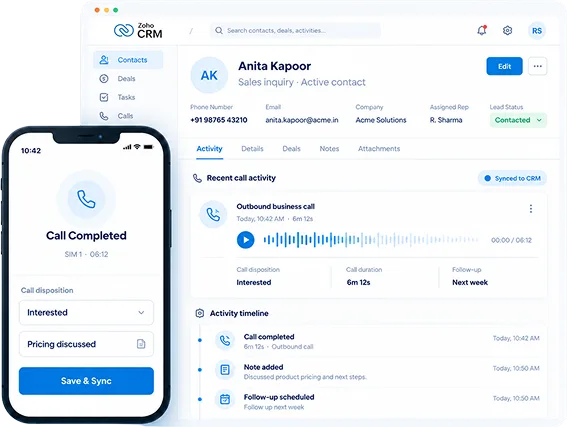
Zoho CRM Has a Telephony Section. It Just Does Not Work for SIM Calls.
Zoho PhoneBridge requires a cloud telephony provider. Most Indian sales teams do not use one. They call from mobile numbers, and every one of those conversations stays invisible inside Zoho CRM unless someone logs it manually.
From SIM Call to Zoho CRM Record in Four Steps
Connect Zoho CRM once, let reps keep calling from their existing SIM numbers, and automatically push completed call activity to the right CRM record.
Your Zoho Admin Configures the Webhook
One-time setup. No middleware. Calls start logging from that point.
Reps Call from Their Own SIM
Same device, same SIM. No new dialer, no process change on the rep's end.
Disposition Entered Right After the Call
A post-call prompt collects the outcome, notes, and call classification.
Full Activity Record Appears in Zoho CRM
Call details, recording, and disposition pushed to the matched contact or lead.
What Lands in Your Zoho CRM After Every Call
Every synced business call adds the key details your team needs directly to Zoho CRM, including call activity, outcomes, notes, recordings, and sync status.
Recording on the Activity Record
Call recordings attach directly to the Zoho CRM activity. Your team can play them back without leaving the CRM record.
Disposition as a Logged Outcome
Outcome label, call type, and follow-up status logged against the Zoho contact or lead. Not a note field. An actual structured outcome.
Full Call Metadata
Caller name, number, call direction, duration, date, and time. Every field captured and written to the right Zoho record.
Rep Notes Attached at Source
Notes added by the rep at call-end attach to the same Zoho CRM activity. No separate follow-up task, no memory required.
New Leads Created Automatically
Numbers not in Zoho CRM? CallAnchor creates a new lead automatically so every outreach and inbound call is tracked, never lost.
Sync Status in the Admin Portal
Each call shows as Synced, Pending, or Failed. Admins can see what did or did not go through the portal and retry it from there.
Your Reps Do Not Need a New App. Your Zoho CRM Just Needs to Hear from Them.
Start Free TrialCall Data Goes into Zoho CRM. It Does Not Live Anywhere Else.
360 CallAnchor is not a data warehouse. It is a pass-through layer. Call records, recordings, and disposition data move from the rep's device into your Zoho CRM and stop there.
How Data Moves
- Call records and recordings pass to Zoho CRM via webhook, not stored on 360 CallAnchor servers.
- Once synced, the record lives entirely within your Zoho CRM environment.
- No customer data sits on a third-party server between the call and the CRM.
Data Retention Before Sync
- Connectivity drops, call data saves locally on the device and syncs when it returns.
- Admins set the retention window: real-time, 1 hr, 12 hrs, 1 day, or 30 days.
- Sync status is visible per call: Synced, Pending, or Failed.
Recording and Consent
- Recording is admin-controlled and can be disabled at account level.
- Personal calls can be excluded; only business calls are tracked.
- Must comply with applicable consent laws and your company's internal policy.
Stop Running Your Sales Team on a CRM That Cannot See Their Calls
Start capturing the mobile calls Zoho CRM never sees. Log them automatically, with recordings and notes attached.
Talk to SalesFrequently Asked Questions
Everything you need to know about connecting SIM-based calling with Zoho CRM.