
Best Runo Alternative for CRM Integration
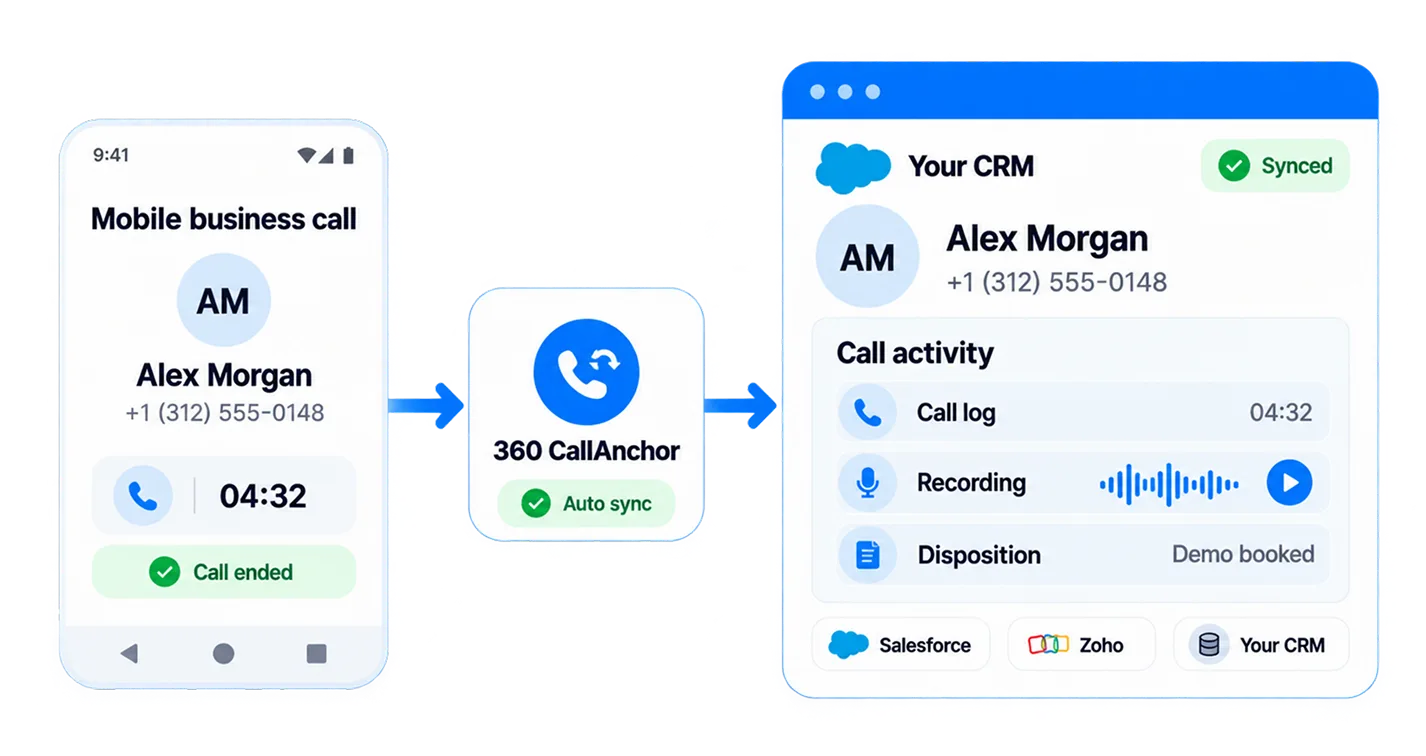
Runo is a call management CRM with its own lead portal. 360 CallAnchor is not a CRM. It syncs every mobile business call directly into your CRM, automatically.
360 CallAnchor vs Runo
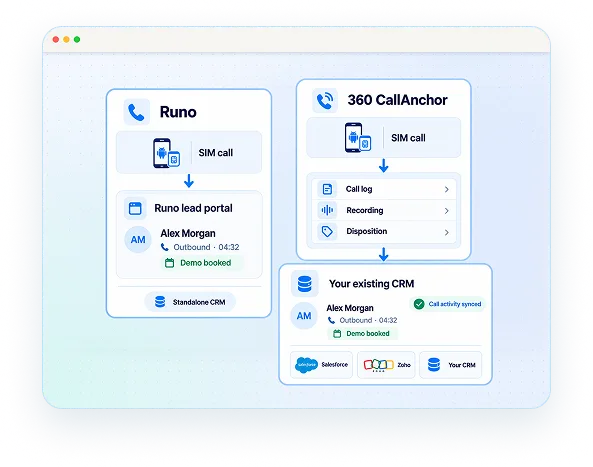
Both tools offer SIM-based call logging on Android. The core difference is where your data goes.
Runo is a standalone call management CRM; it handles leads inside its own portal.
360 CallAnchor is a CRM integration layer; it pushes call logs, recordings, and disposition notes directly into Salesforce, Zoho, or any CRM your team already uses.
If CRM integration is what you need from Runo, CallAnchor is the purpose-built alternative.
Trusted By Growing Mobile Sales Teams




Why Teams Look for Runo Alternatives
Before choosing a Runo alternative for CRM Integration, teams evaluate CRM compatibility, workflow flexibility, and how easily customer conversations connect with their existing systems.
Salesforce Not Supported Natively
Salesforce is not among Runo's 10 listed native integrations. Teams on Salesforce need a Zapier workflow or a custom connector just to sync call data across.
Duplicate Sales Workflows
Runo comes with its own lead management portal. Teams using Salesforce or Zoho end up managing the same sales process across two separate platforms.
Data Across Multiple Systems
Calling activity and customer records can become separated when teams manage conversations outside their primary CRM.
Added Platform Cost
If your team already uses a CRM, adding another sales platform can increase software costs and require managing another system.
How 360 CallAnchor Complements Your CRM Workflow
From automatic call logging to configurable dispositions, every feature in 360 CallAnchor is designed to keep your CRM as the only system your team needs.
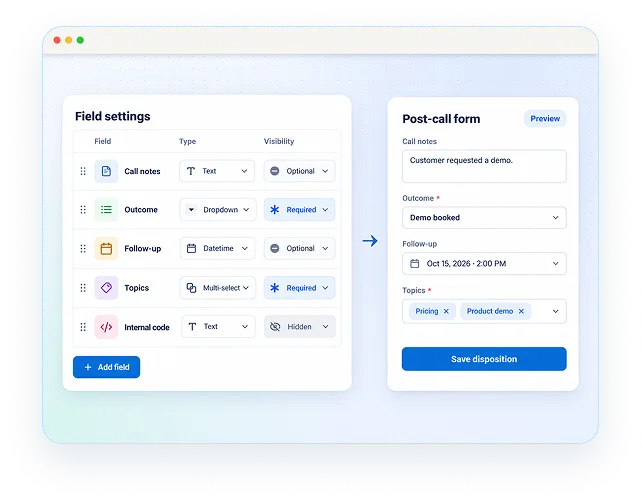
Custom Disposition Fields
Admins build the post call form with custom field types: text, dropdown, datetime, and multi select. Each field is required, optional, or hidden.
Business and Personal Call Separation
Reps mark each call as business or personal before it syncs, so only relevant customer conversations reach your CRM.
Offline Call Sync
Calls logged with no network coverage queue on the device and sync automatically the moment connectivity returns.
Failed Sync Visibility and Retry
Any call that fails to sync is flagged for the admin, with a clear retry option so no conversation is lost.
Caller ID and Call History Filters
Admin configurable, from real time up to 30 days, so managers can filter call history by caller ID and date range.
Manager Dashboard
Gives managers a single view of call volume, sync status, and disposition outcomes across the team.
360 CallAnchor Vs. Runo: The Clear Choice for CRM Teams
One tool syncs to the CRM your team already runs on. The other asks you to run a new one alongside it. The difference shows up in every row.
| Capability | Runo | 360 CallAnchor |
|---|---|---|
| Salesforce Integration | ✗ Not a listed native integration | ✓ Native OAuth. Zero middleware. |
| CRM Approach | ✗ Comes with its own CRM portal to manage | ✓ Syncs to the CRM you already use |
| Data Ownership | ✗ Call data stored in Runo's platform | ✓ Your CRM. Your data. Always. |
| Pricing | Starts at ₹599 per user/month | Starts at ₹490 per number/month |
| Setup for CRM Teams | Not publicly documented | Connect your CRM and start same day |
What the Move Away From Runo Actually Looks Like
Most teams expect a migration project. With 360 CallAnchor, there's no data move, workflow rebuild, or team retraining. Just install and connect.
Sales & Revenue Ops
- Your Salesforce or Zoho org
- All existing leads, contacts, and records
- Your sales process and pipeline stages
Finance & Accounting
- Managing two separate platforms
- Running Zapier workflows to push call data
- Logging calls manually after each conversation
Human Resources
- Reps install the Android app
- Admin connects to CRM via OAuth
- Disposition form configured in minutes
- First call syncs automatically
FAQs
What Is the Best Runo Alternative for CRM Integration?
360 CallAnchor is the best Runo alternative for teams that need CRM integration with their existing Salesforce, Zoho, or any CRM. Unlike Runo, which operates as a standalone call management CRM with its own portal, 360 CallAnchor functions as a sync layer, capturing SIM-based mobile calls and pushing the full record directly into the CRM the team already uses.
Does Runo Offer Native Salesforce Integration for Call Logging?
No. Salesforce is not listed among Runo's native integrations, so teams on Salesforce typically need a Zapier workflow or a custom connector to move call data across. 360 CallAnchor connects to Salesforce natively, with no middleware required.
How Does 360 CallAnchor Handle Automatic Call Logging on Mobile?
360 CallAnchor captures calls made from the employee's own SIM card as they happen, with no second dialler or app for the rep to learn beyond the install. Call logs, recordings, and disposition notes are then synced automatically into the CRM, with offline calls queued on the device and synced once it reconnects.
How Does 360 CallAnchor Compare to Runo and Other Runo Competitors?
Runo and similar call management tools ask teams to run a separate portal alongside their CRM. 360 CallAnchor takes a different approach: it is not a CRM, it is a sync layer that pushes every mobile call directly into Salesforce, Zoho, or any CRM your team already runs, so reps and managers keep working in one system.
Is Runo a Practical Option for Teams Already Using Salesforce or Zoho?
Runo works as a standalone call management CRM with its own lead portal, so teams already running Salesforce or Zoho end up managing the same sales process in two places. For teams who want to keep their existing CRM as the single source of truth, 360 CallAnchor is built to sync into that CRM rather than replace it.
What Data From a Mobile Call Does 360 CallAnchor Sync Into a CRM?
Every synced call carries the call log, the recording where enabled, and the disposition notes captured on the post-call form, together with caller ID and call history detail, so the complete record sits inside the CRM alongside the contact.